Clean JavaScript Event Loop
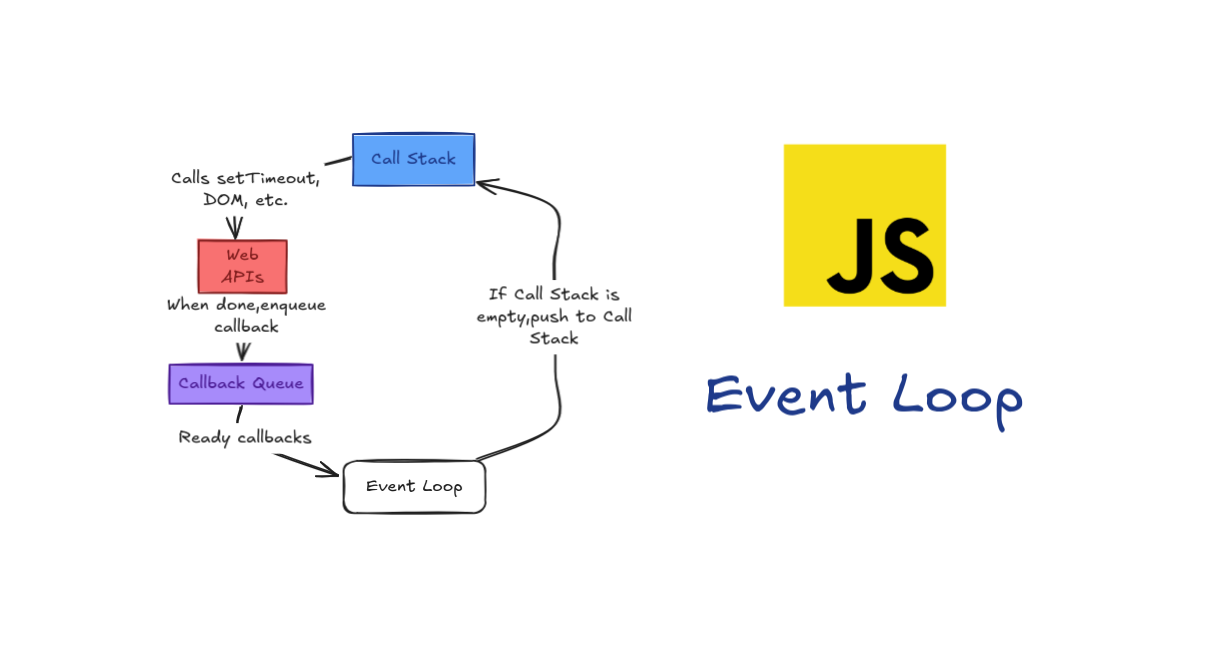
maybe I should fill it later
JavaScript in the Browser
The simplified view many developers have of JavaScript looks like this:
JavaScript Runtime (V8)
├── Call Stack
└── Heap
But the reality is far more complex and interesting:
Complete JavaScript Environment
├── JavaScript Runtime (V8)
│   ├── Call Stack
│   └── Heap
├── Web APIs
│   ├── DOM
│   ├── AJAX
│   ├── setTimeout
│   └── Other browser APIs
├── Event Loop
└── Callback Queue
This expanded view reveals why JavaScript can handle asynchronous operations despite being single-threaded: the browser provides additional capabilities that work alongside the JavaScript runtime.
Understanding the Call Stack
JavaScript is a single-threaded language with a single call stack, meaning it can only do one thing at a time. The call stack is a data structure that records where we are in program execution.
Consider this simple example:
function multiply(a, b) {
    return a * b;
}

function square(n) {
    return multiply(n, n);
}

function printSquare(n) {
    var squared = square(n);
    console.log(squared);
}

printSquare(4);
When this code executes:
main()(the file itself) gets pushed onto the stackFunction definitions are processed
printSquare(4)is called and pushed onto the stackInside
printSquare,square(4)is called and pushed onto the stackInside
square,multiply(4, 4)is called and pushed onto the stackmultiplyreturns 16, gets popped off the stacksquarereturns 16, gets popped off the stackconsole.log(16)is called and pushed onto the stackconsole.logcompletes, gets popped off the stackprintSquarecompletes, gets popped off the stackmaincompletes, stack is empty
You've seen this call stack in action whenever you encounter an error:
function foo() {
    throw new Error('Oops!');
}

function bar() {
    foo();
}

function baz() {
    bar();
}

baz();
The resulting error shows the stack trace: Error: Oops! at foo at bar at baz at main, representing the state of the call stack when the error occurred.
The Problem with Blocking
Since JavaScript has a single call stack, what happens when operations are slow? This is where the concept of "blocking" comes in. Blocking refers to code that takes a long time to execute, such as:
Network requests
File operations
Complex computations
Large loops
Consider what would happen if network requests were synchronous:
var result1 = getSyncRequest('<http://api1.com>');
var result2 = getSyncRequest('<http://api2.com>');
var result3 = getSyncRequest('<http://api3.com>');
console.log('All done!');
With synchronous requests, the browser would freeze during each network call. Users couldn't click buttons, scroll, or interact with the page until all requests completed. This creates a terrible user experience and is why blocking the call stack is problematic in browser environments.
The Solution: Asynchronous Callbacks
To solve the blocking problem, JavaScript uses asynchronous callbacks. Instead of waiting for slow operations, we provide a callback function to be executed when the operation completes:
console.log('Hi');

setTimeout(function() {
    console.log('There');
}, 5000);

console.log('JSConf');
This code outputs:
Hi
JSConf
There (after 5 seconds)
But how does this actually work? How does setTimeout manage to run code in the future without blocking the current execution?
The Event Loop Explained
The event loop is the mechanism that coordinates between the JavaScript runtime and the browser's additional capabilities. Here's how it works:
Step 1: Web APIs Handle Asynchronous Operations
When you call setTimeout, the JavaScript runtime doesn't handle the timing itself. Instead:
The
setTimeoutcall is made with a callback function and delayThe browser's Web API takes over, starting a timer
The
setTimeoutcall immediately completes and is popped off the stackThe timer runs independently in the Web API environment
Step 2: Completed Operations Enter the Callback Queue
When the Web API operation completes (timer expires, network request finishes, etc.), it can't immediately execute the callback. Instead, it pushes the callback onto the callback queue (also called the task queue).
Step 3: The Event Loop Monitors and Coordinates
The event loop has one simple job: monitor the call stack and the callback queue. When the call stack is empty, it takes the first callback from the queue and pushes it onto the stack for execution.
This process ensures that:
Asynchronous callbacks never interrupt currently executing code
Callbacks are executed in the order they were queued
The main thread remains responsive
Practical Examples and Implications
setTimeout(0) - The Mysterious Zero Delay
You might have encountered setTimeout(0) and wondered why anyone would want to run code "immediately" using a timer. The answer lies in the event loop:
console.log('Hi');

setTimeout(function() {
    console.log('There');
}, 0);

console.log('JSConf');
Even with a 0-millisecond delay, the output is still:
Hi
JSConf
There
This happens because setTimeout(0) doesn't execute immediately—it queues the callback to run after the current stack clears. It's a way to defer execution until the next "tick" of the event loop.
Timing is Not Guaranteed
An important concept to understand is that setTimeout provides a minimum delay, not a guaranteed execution time. If the call stack is busy when the timer expires, the callback must wait:
setTimeout(function() {
    console.log('This might not run exactly after 1 second');
}, 1000);

// Some long-running code
for (var i = 0; i < 1000000000; i++) {
    // Blocking the stack
}
The callback will only execute after both the 1-second timer expires AND the call stack is clear.
The Difference Between Sync and Async Callbacks
Not all callbacks are asynchronous. Consider the difference:
// Synchronous callback
[1, 2, 3].forEach(function(item) {
    console.log(item);
});

// Asynchronous callback
setTimeout(function() {
    console.log('Async callback');
}, 0);
The forEach callback executes immediately as part of the current stack, while the setTimeout callback is queued for future execution.
Rendering and the Event Loop
One crucial aspect often overlooked is how the event loop affects browser rendering. The browser wants to repaint the screen every 16.6 milliseconds (60 FPS) for smooth user interfaces. However, rendering cannot occur while there's code on the call stack.
The render operation is similar to a callback—it must wait for the stack to clear. This is why:
Heavy computations make interfaces feel sluggish
Smooth animations require careful timing
"Don't block the event loop" is common advice
Consider this example:
// Blocking approach - poor user experience
for (var i = 0; i < 1000000; i++) {
    processItem(i); // Heavy computation
}

// Non-blocking approach - better user experience
function processAsync(i) {
    if (i < 1000000) {
        processItem(i);
        setTimeout(function() {
            processAsync(i + 1);
        }, 0);
    }
}
processAsync(0);
The asynchronous approach allows renders to occur between processing steps, maintaining a responsive interface.
Real-World Implications
Scroll Event Handling
Scroll events fire frequently—potentially on every frame. Without proper handling, you might flood the callback queue:
// Problematic approach
document.addEventListener('scroll', function() {
    // Heavy computation on every scroll event
    performExpensiveCalculation();
});

// Better approach with debouncing
var scrollTimeout;
document.addEventListener('scroll', function() {
    clearTimeout(scrollTimeout);
    scrollTimeout = setTimeout(function() {
        performExpensiveCalculation();
    }, 100);
});
AJAX Requests
Understanding the event loop helps explain why AJAX requests don't block the interface:
console.log('Starting request');

xhr.open('GET', '<https://api.example.com/data>');
xhr.onload = function() {
    console.log('Request completed');
};
xhr.send();

console.log('Request initiated');
Output:
Starting request
Request initiated
Request completed (when response arrives)
The network request happens in the Web API environment, allowing other code to continue executing.
Node.js and the Event Loop
While this explanation focuses on browser environments, the same concepts apply to Node.js with slight variations:
Instead of Web APIs, Node.js uses C++ APIs
The threading is handled by libuv (Node's event loop implementation)
File system operations, network requests, and timers work similarly
Key Takeaways
JavaScript Runtime vs. Complete Environment: The JavaScript engine (V8) is just one part of the execution environment. Web APIs provide additional capabilities.
Single-Threaded with Concurrency: JavaScript is single-threaded, but the browser environment enables concurrent operations through Web APIs and the event loop.
Event Loop's Simple Job: The event loop continuously checks if the call stack is empty and moves callbacks from the queue to the stack.
Timing is Approximate:
setTimeoutand similar functions provide minimum delays, not guaranteed execution times.Rendering Depends on Stack State: Browser rendering must wait for the call stack to clear, making performance optimization crucial.
Callbacks vs. Async Callbacks: Not all callbacks are asynchronous—understand the difference between immediate execution and queued execution.
Understanding Leads to Better Code
Grasping these concepts transforms how you write JavaScript. You'll understand why certain patterns exist, how to write more performant code, and how to debug timing-related issues. The event loop isn't just a theoretical concept—it's the foundation of how JavaScript applications actually run.
The next time you write asynchronous code, remember: you're not just writing functions, you're choreographing a complex dance between the JavaScript runtime, Web APIs, callback queues, and the event loop. Understanding this dance makes you a more effective JavaScript developer.
Inspired by Philip Roberts’ JSConf EU talk “What the heck is the event loop anyway?” https://www.youtube.com/watch?v=8aGhZQkoFbQ